Integrating HelloHire with Scan123 helps streamline your hiring workflow by automatically creating candidate folders in Scan123 based on actions taken in Hellohire.
Step 1: Request Integration Setup
At this time, the Scan123 integration must be enabled by the Hellohire team.
To get started:
- Contact Hellohire Support and request to connect your Scan123 account.
Step 2: Provide Your Scan123 Credentials
You will need to provide the following Scan123 credentials:
Email
Password
Cabinet ID
Folder Status ID
These credentials allow Hellohire to securely connect to your Scan123 account.
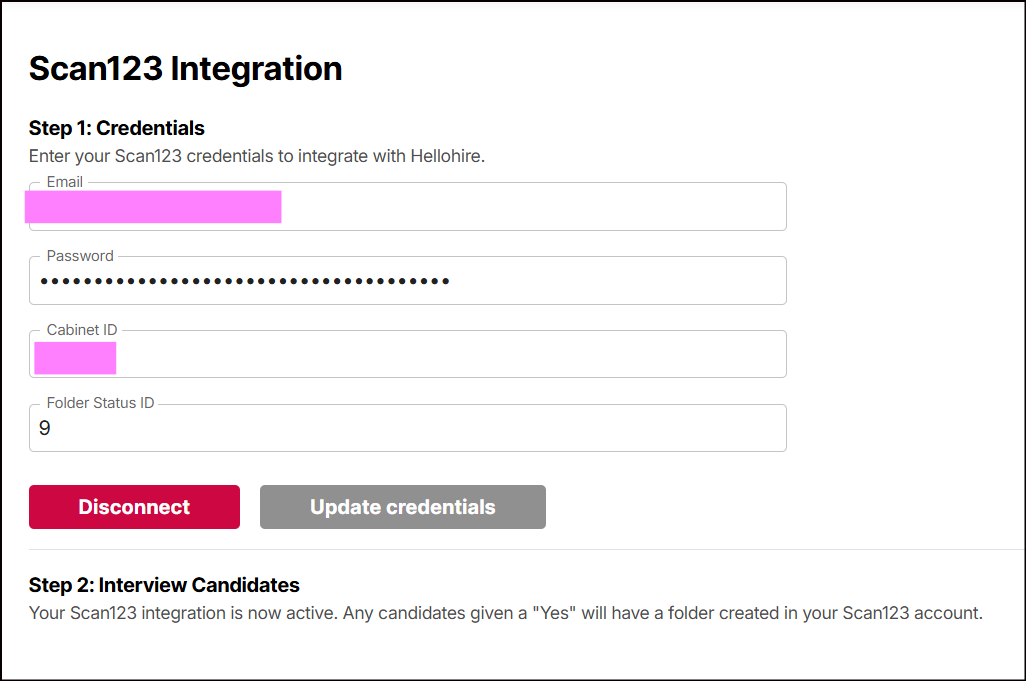
After the integration is active:
When a candidate is given a “Yes” in Hellohire,
A folder will automatically be created in your Scan123 account.
Need a hand getting set up?
We’re here for you! If you have any questions or need help connecting Hellohire to Scan123, don’t hesitate to reach out. You can contact your Account Manager directly, or send us an email at support@tryhellohire.com. We’re here to make sure everything goes smoothly!
Was this article helpful?
That’s Great!
Thank you for your feedback
Sorry! We couldn't be helpful
Thank you for your feedback
Feedback sent
We appreciate your effort and will try to fix the article