Integrating Hellohire with CareSmartz360 allows you to automatically create caregiver applicants in CareSmartz360 when candidates move forward in Hellohire. Once connected, any candidate marked “Yes” in Hellohire will be created as a caregiver applicant in your CareSmartz360 account.
How to generate your Credentials from CareSmartz360?
Step 1: Obtain Your CareSmartz360 Credentials
To connect Hellohire to CareSmartz360, you will need the following:
1. Username
- This is your CareSmartz360 Admin account username.
2. Password
- This is your CareSmartz360 Admin account password.
Note: Make sure you use an Admin-level account to ensure proper integration access.
3. Agency ID
- You can find your Agency ID in CareSmartz360 by following their official help article: https://www.intercom.help/caresmartz/en/articles/3056343-agency-id
4. Office ID
- Please contact CareSmartz360 Support for assistance.
Step 2: Navigate to Integration
1. Log in to your Hellohire account: https://www.tryhellohire.com
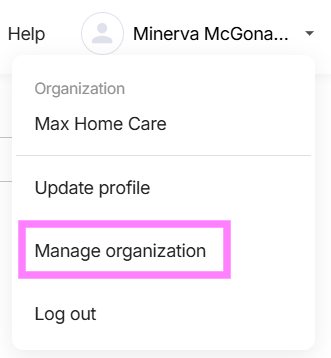
2. Click the dropdown in the top-right corner of your screen.
3. Select Manage organization > Integrations
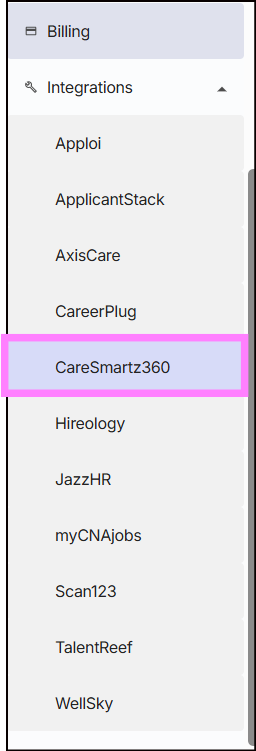
4. Click the dropdown beside Integrations and select CareSmartz360
Step 3: Enter Credentials
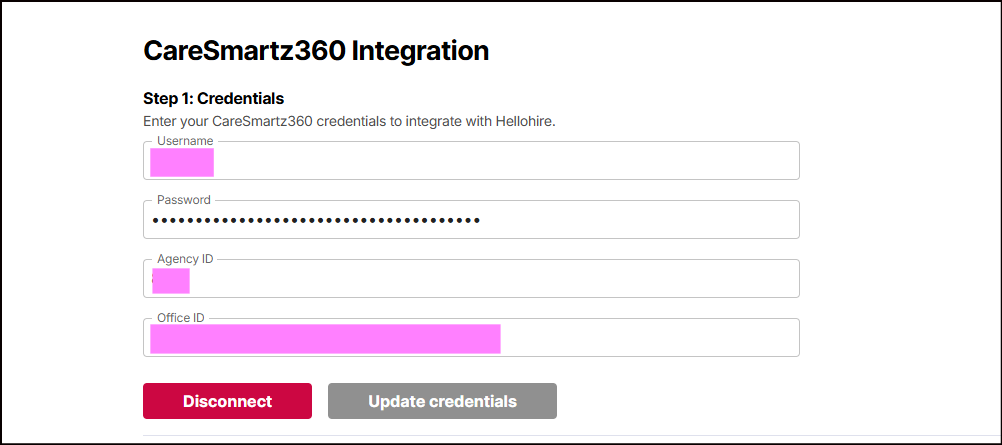
1. Input your Credentials:
Username
Password
Agency ID
Office ID
Step 4: Interview and Approve Candidates
Once the integration is active:
Interview candidates in Hellohire as usual.
When a candidate is marked “Yes”, Hellohire will automatically create them as a caregiver applicant in CareSmartz360.
What Information Is Sent to CareSmartz360?
When a candidate is marked “Yes” in Hellohire, the following information is sent to CareSmartz360 and created as a caregiver applicant:
Name
Email Address
Status – Automatically set to “Interview Done” (hardcoded)
Report URL – Added as a note in the applicant profile
Need a hand getting set up?
We’re here for you! If you have any questions or need help connecting Hellohire to CareSmartz360, don’t hesitate to reach out. You can contact your Account Manager directly, or send us an email at support@tryhellohire.com. We’re here to make sure everything goes smoothly!
Was this article helpful?
That’s Great!
Thank you for your feedback
Sorry! We couldn't be helpful
Thank you for your feedback
Feedback sent
We appreciate your effort and will try to fix the article